✨ ComplyCAD is live — smart A* cable routing and AS/NZS compliance sizers
🚀 Simplified CAD Automation

Auto-Generate Low-Voltage Schematics & Compliance Reports

Input your building structure to automatically draft single-line block diagrams, route cables around obstacles, perform voltage-drop checks, and print clean electrician handout checklists.
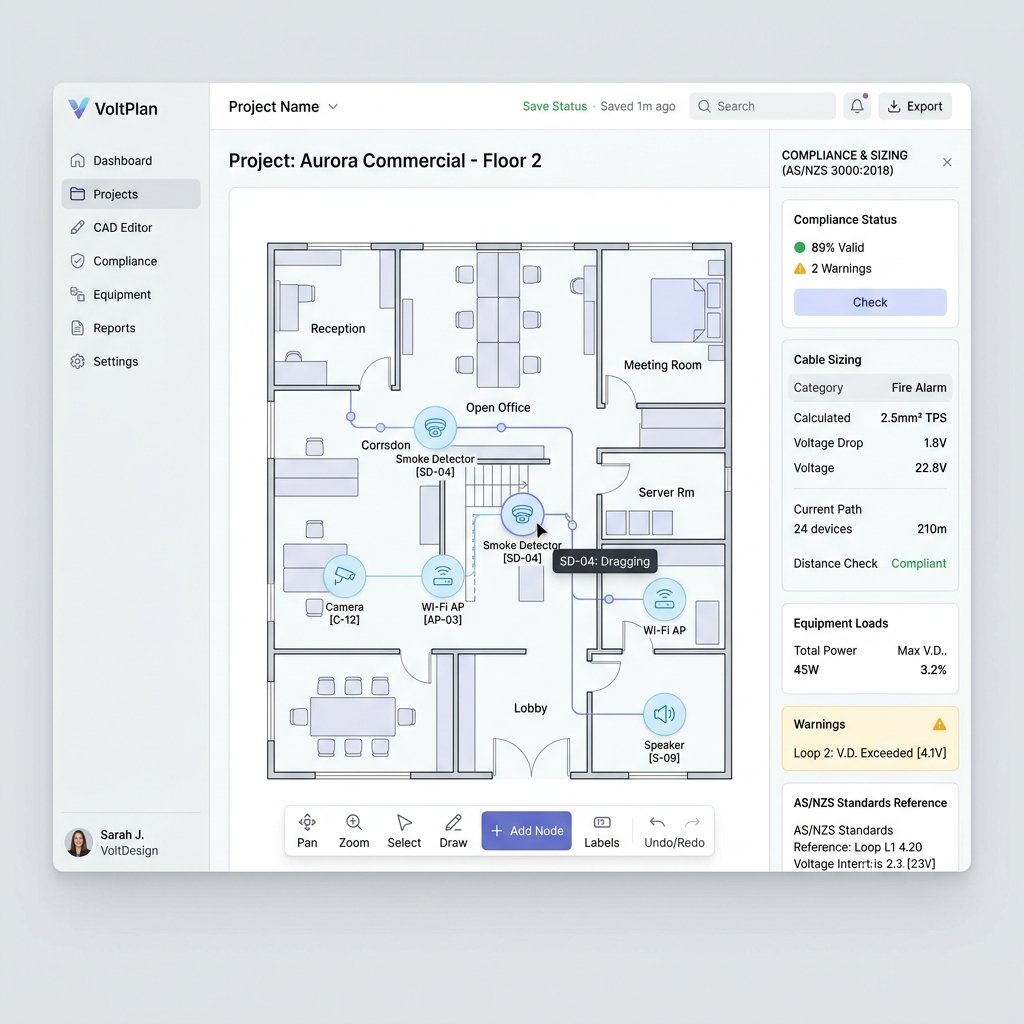
ComplyCAD System Schematic Workspace Dashboard
Features Overview

Simple, Structured Drafting Automation

Every capability is designed to save drafting time and enforce standard installation guidelines.

Auto-Generated Schematics

Input your levels and apartment configurations. The layout engine instantly generates orthogonal single-line block diagrams without manual drawing.

A* Cable Pathfinding

Cables route around equipment symbols and annotation boxes rather than cutting straight through them, creating professional CAD-grade blueprints.

Switch Port Capacity Checks

Set hardware thresholds (e.g. 8 or 24 ports). The engine monitors connection limits and auto-routes subsequent cables to available secondary switches.

Floor Plan Layout Editor

Reposition room boundaries inside apartments. Drag rooms on the grid, swap widths/heights, flip layout mirrors, and copy floor layouts to save time.

AS/NZS Compliance Sizers

Check DC voltage drops based on cable gauges. Calculate Sealed Lead Acid battery standby capacities automatically under AS/NZS 2201 (Security) and AS 1670.1 (Fire) standards.

Electrician A4 Printouts

Print an installation guide broken down by floor, apartment and room. In the browser, each device can be ticked from pending to installed to tested, and the project's progress counters follow along.

Live Playground

Interactive Blueprint Generator

Change the building structure below to watch the schematic redraw and recalculate costs.

1. Adjust Parameters

Building Floor Levels 5 Floors
Apartments Per Floor 4 Units
Project Estimation Client Proposal
Apartments Count: 20
Devices Quantity: 45
Estimated Cables: 675m
Materials Subtotal: $7,425
Installation Labor (Avg): $5,737
Estimated Total: $13,162

2. Live Generated Schematic Block Diagram

Auto-Layout CAD
Purple: Intercom nodes • Blue: CCTV nodes • Amber: Access locks • Green line: Cable path

Calculations & Compliance Audit Visual

RISER COLUMNS 24V PSU / SWITCH Main Hub Node ✓ Intercom (Apt 1) 15m (1.5mm²) • V_drop: 1.8% (PASS) ⚠ Mag Lock (Apt 2) 85m (Cat6) • V_drop: 12.4% (FAIL) ACTION: Upgrade wire gauge
AS/NZS Compliance Engineering

Validate Standards Prior to Install

ComplyCAD runs active mathematical checks based on Australian standards directly inside your diagram canvas:

01

AS/NZS 2201.1 Security Sizing

Enforces standby sizers (4h to 24h) for Sealed Lead Acid (SLA) batteries based on total quiescent device currents.

02

AS 1670.1 Fire Alarm Standby

Calculates required dual-battery 24V series cabinets, incorporating a 25% aging degradation margin.

03

DC Voltage Drop Compliance

Checks Ohm's Law voltage drop along A* generated wire lengths, warning of low operating power.

Pricing

Subscription Plans

Prices are in AUD per month. Starter and Professional both begin with a 14-day free trial — no charge until the trial ends, cancel any time from the billing portal.

Starter License

For local electricians and small residential builders.

$59 / month

14-day free trial

  • ✓ Up to 3 active projects
  • ✓ Auto-schematic wizard
  • ✓ Orthogonal cable routing
  • ✓ PDF and PNG schematic exports
  • ✓ A4 printable electrician checklist
Start free trial
Most Popular

Professional License

For commercial low-voltage system integrators.

$119 / month

14-day free trial

  • ✓ Unlimited active projects
  • ✓ Smart A* obstacle avoidance routing
  • ✓ PM room layout editor (drag & flip)
  • ✓ Switch port load balancing checks
  • ✓ Bill of materials & costing CSV export
Start free trial

Enterprise Suite

For larger firms with requirements beyond the standard plans.

Custom quote

Priced per engagement

  • ✓ Everything in Professional
  • ✓ Custom title block with your firm's logo
  • • Multi-user access — on request
  • • DWG import/export — on request
  • • Procore directory sync — on request

Items marked "on request" are not part of the product today. Tell us what you need and we will quote it.

Talk to us

A free account is included with sign-up: one active project, so you can try the wizard before subscribing.